
Archived from the original dev blog and left as it was written, so it reflects the game as it stood in 2008.
There's one thing that several mid range level designers will tell you to stay away from; the carve tool, angles, vertex editing, and others. Occasionally they're right but one thing a Level Designer should never be afraid of is angles as it will do nothing but start to make your maps boxy. This week is about how to do angles properly.
The biggest thing with working angles in source is to forget them, 10°. What's that's? 22.5°. I don't know what you mean. So what do you use instead of angles? The answer is simple Ratios. Specifically rise:run , how many units you go across compared to how many units you go up.
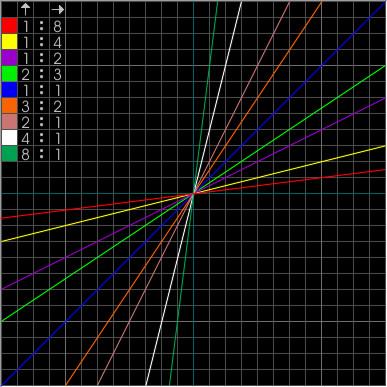
These are what I consider the cardinal angles for level design, there's only a few of them but as you can see they cover most major types of angle. With brushwork angled like this you can line up vertices onto the brush part way along easily, this means you can easily create areas that are on a good slope without worrying about making everything func_detail, see below.
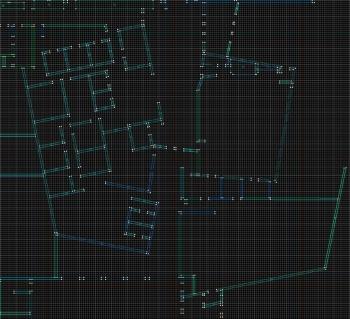
As you can see a lot of the map is at odd angles, granted this picture is from it in a very WIP state. I scrapped the map eventually because of how much custom content it needed and the fact that the sizes of a few things were off. I assumed wall sizes were constant through the building whereas they were not causing sizing issues. Regardless of that it’s still an excellent example of using ratios over just rotating things. It could be nowhere as neat or detailed if the ratios were not used. Another thing is that it is much easier to keep shapes valid when using ratios. If one were to make a cylinder then want to slant some of the edges, for those who don't know what their doing it is simply impossible as invalid brushes are created without fail. If the sides are kept on a ratio, it becomes much easier to deal with. Ensure both the top and bottom of the slope use the same ratio and you will be able to slant that face as much as you want, using the same ratio doesn't mean the same length so it can work easily for you; however you may find to line things up easily you need to go down several notches on the grid size.
Anytime there's a slope or an angle in your map whether your fitting a doorway or just throwing on a decal you should try align it to a ratio so whatever work you have to do with is made easier for you. Ratios won't always save you though so resorting to triangulating brushes is a valid option.