
Archived from the original dev blog and left as it was written, so it reflects the game as it stood in 2008.
The Blog for Feb 17th was skipped for those that didn’t notice. I did not get the chance to pre write that weeks article as I had some things that needed doing for Friday and after that I spent the rest of the weekend enjoying the fact I had recently been let go from my job 😉
This week I’m going to be dealing with how to find things with Hammer, be they compile problems or rouge entities. There are several utilities and methods that can be employed to track things down so first we’ll start with the tools built into Hammer and then cover so ways you can manually track down problems.
First we’ll start with the simplest two which are Goto commands. Both are available under the View menu “Goto Brush Number” and “Goto Coordinates” Often you receive a message about a brush and this coordinates or brush X without these commands you’d be fishing around the map but both will take you to directly what you’re after. Next is an invaluable utility the entity report, found in “Map -> Entity Report” it appears as shown below.
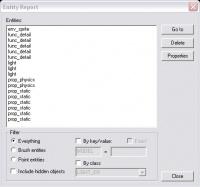
This shows every entity in the map grouped by type and allows you to filter them using the options below. The “By key/value” is a useful one as with it you could find every entity that has a specific model or every light with the same color. Another useful tool is Alt+P, this scans the map for problems and pops up a message, most you can usually ignore quite easily but there are a few to take note of.
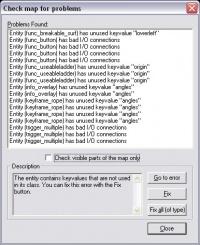
Running this occasionally is a good thing as it can show problems before you know about them. Often there are things you need to find without enough information to dig up.
Most problems are found at the compiling stage and in that window it tells you how your compiles going it’s a report of what went right and what went wrong. The untrained eye often skips over the problems telling everyone their compile went fine but they still have an error. The folks over at Interlopers have developed a great tool for making sure you don’t miss any errors; Interloper's Compile Log Checker post your compile log in there and it will find a good 99.9% of them. One approach is the inclusion/exclusion this is easiest done with visgroups. If an error occurs hide the suspect visgroup, then recompile. IF the problem goes then you know its one of the entities inside that visgroup. If it doesn’t keep hiding more till you think you have it pinned down to one group which you can then look through. Sometimes though you know the problem but have no clue where it is and without any reference information you can’t track down where it is on the map, in this situation its best to turn to the Isolation Method. By halving the map with the cordon tool it pins down what part of the map the error is occurring in so you can look for it more precisely.
Between all these methods and tools you can usually pin down an error pretty quickly, resolving the error is another matter altogether.