
Archived from the original dev blog and left as it was written, so it reflects the game as it stood in 2008.
Get it? Cause convex lenses focus light… man I wonder if anyone has picked up on half the puns I keep using for article titles. This week is simply going to be on invalid brushes: how to recognize, common causes, common symptoms, and ways to avoid them.
When it comes down to invalid brushes there are really three categories: holes in the mesh, multi planar faces, and a concave shape. Below is a picture showing all three in practice with how they would look in Hammer.
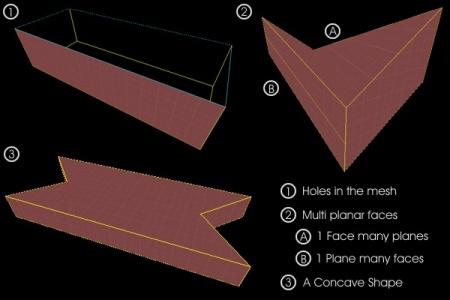
While the implementations vary a lot the problem always stems from one of these issues. For those unsure of what a plane is, think of it as 2D grid. It can be any rotation in 3D space and is infinitely large, that’s a plane. On one brush each face is supposed to have a unique plane for several reasons. Getting a hole in your mesh is the most difficult error to create but excessive complex off grid brushwork is a good a start to getting there.
Almost unanimously the cause for invalid brushes is the vertex editing tool and complex primitives. Using simple primitives like arches, cylinders, and blocks; and simple tools like clipping, resizing, rotating it is impossible to produce an invalid brush. The reason complex primitives suffer this problem is that they snap vertices to a grid of 1x1. This is usually disastrous as to maintain the shape properly vertices would need to be placed on decimal locations like 12.4 54.2 64.3. When rounded the vertex’s movement almost always causes a multi planar face. The reason the vertex editing tool can cause them is nothing more than inexperience. Properly used the tool will never cause them, but used the wrong way it can create them in an almost guaranteed fashion, this is why some other level designers advise against it.
Generally there are two main symptoms for invalid brushes, changing shape and disappearing. Either can appear to happen once inside the game or when re-loading the map into Hammer. This happens because Hammer saves the map file and that saved file is what’s passed to the compiler. So the root causes of the disappearing and misshapen brushes is the saved file, the reason is very simple. As I mentioned earlier each face is supposed to have a unique plane, Hammer saves each plane for the brush and then defines the faces, edges, and vertices for an object from where the planes intersect. Doing it this way exponentially saves file space for storage and processing; however, it’s what causes the problem. If just the planes are saved lets look at what that does to the types of invalid brushes.
Holes in the mesh – Some faces will be infinite, if there’s a hole in the mesh some of the planes may not ever touch, and there’s no way a valid brush could have infinite size.
Multi Planar Faces – If multiple faces have the same plan how does the equation handle that, do both planes constantly intersect creating infinite amounts of edges or do they not intersect each other and have duplicate faces. Neither sounds valid, so how about a face with multiple planes, well only one will be stored. This means that the brush won’t retain it shapes and will be entirely different when loaded and is pretty much the sole cause for that type of problem.
Concave shapes – A concave shape bends back in on itself, so how are the intersections for that handled, a plane could intersect other planes before they intersects the planes they were meant to, there’s no way to tell the valid shape any more as there’s a million possible shapes to be made depending upon the order processed, none of them right. The faces of concave shapes sometimes appear to jump outside of the object and other issues causing weird shapes changes.
So now we know what invalid brushes are, how exactly do we avoid them? There are four approaches I use: Triangulating, Measuring, Resizing, and the Line Approach.
Triangulating – So I’ve talked a lot about planes but never actually mentioned how one is defined. As far as source is concerned a plane is defined by 3 points. Think of it like this, you have a piece of cardboard and 3 long sticks. No matter where you move the 3 sticks or what height you make them you can rest the cardboard so it touches all 3 sticks. If you used less sticks, there’s lots of ways of it could rotate all or fall off. If you used more sticks then you can’t have them anywhere you want as the cardboard may not touch every stick. So with 3 points you can ALWAYS get a valid plane, and there’s where triangulation comes in. If you face is triangular it’s impossible for the face to be invalid, if every face of the brush is triangular it’s impossible for the brush to be invalid. So why don’t we triangulate everything? Simply because the source engine batch process polygons, if 1 face has 12 polies it will render faster than 12 1 poly faces. So by triangulating brushes you’re preventing source from batch processing the faces and making your geometry more expensive to render.
Measuring – The main thing behind measuring is simply keeping track of the shape your building. If you’ve put the top at an angle, remember that ration, then when you have to slope or adjust the other side you can match that ratio and keep it valid. Going back to the stick analogy, if you know the exact heights and positions of the first three sticks you can add a fourth that touches the cardboard if you measure where it should go. So by keeping track of the plane your face is on you can create many sided faces on really odd angles, this is my preferred method despite being the most time consuming and requiring the most experience to do effectively.
Resizing – This method is one that’s mostly looked down upon as it always creates off grid vertices but if its func_detailed then it’s tolerable. The premise is simple, build really really big; say a good 20x bigger than you want it to be if not more. Then once source has sorted out the invalid brushes and nudged things (reloading the map if needed) so they fit then you simply scale it down to size. The only time you ever catch me using it is with the sphere primitive as that snaps to a 1x1 grid, so with it being oversized that means smaller errors when first created than it would at the correct size. I do not advocate the use of this method, but it is something you can do.
Line approach – This method only really works for concave shapes and holes but it basically goes like this, if you draw a line though your object at ANY angle it should only enter and exit the brush once. If it does less or more your shape is invalid. Mentally that may be a little hard for some people to grasp so the way to do it visually is to cover the brush in a transparent texture. Then when you look at the one brush if the texture ever appears to double up you’ve got a concave shape.