
Archived from the original dev blog and left as it was written, so it reflects the game as it stood in 2008.
When taking a map to the level of detail found in Black Mesa the biggest problem is usually visibility. Now anyone with the slightest knowledge about mapping is going to think this is on optimization and well, they’d be wrong.
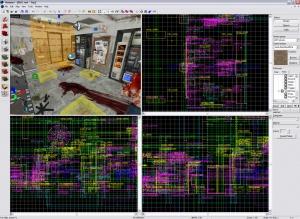
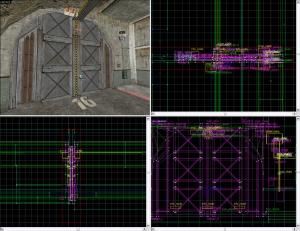
Above is a picture from my application to the team, this pictures is NOT from Black Mesa and NEVER will be. The reason why I include the picture is because what it shows is quite simply a mess. Imagine trying to pick out details in the 2D views and work with them, even while the 3D view is much clearer it’s still really hard to get at some details because of everything in the way. With views like this that contain so much detail how does a Level Designer actually ever see what he’s working on? That’s what I’m going to provide some tips in today.
There are two basic tools for cleaning up your view inside of Hammer; the most commonly used being the Visgroups located on the right and the other being the cordon tools located at the top.
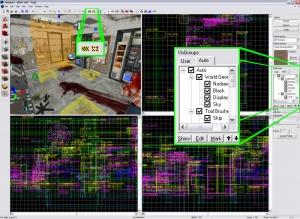
Visgoups are Hammers way of keep track of objects, there are two tabs for the different ways it tracks them. The Auto tab is the one Hammer automatically upkeeps and determines what goes into what area, and the User tab is for ones you create yourself. To enable or disable a Visgroup simply click the check mark. Empty means not shown, black means all shown and grey means only some are shown possibly due to other Visgroups. Entities can belong in any number of Visgroups and they are very practical for thinning out what you’re viewing. Take a look at the picture below, to see how useful it is in some situations.
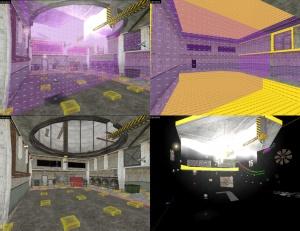
The first is what the scene looks like in Hammer with everything visible, this is what you need when compiling as hidden Visgroups don’t usually compile.
The second is what I would be looking at for brushwork optimization, only world brushes, hints, and area portals are visible as nothing else affects the world brushes.
The third is what I’d look at for NPC interaction, nodes and major obstacles only. This is only world brushes, func_details, props, nodes and NPCs only.
The fourth is what I might look at for rigging entity I/O systems, This one is a little trickier: I enable the point and brush entity groups and then disable things like lights, props, area portals that wont be involved in the I/O system to clean it up a bit more.
You may of noticed the approach isn’t perfect but that was only done using Auto groups, creating your own groups allows you that extra degree of control that’s missing from the auto groups. To make and edit what brushes are in you own Visgroups simply select an object and bring up its properties and go over to the Visgroup tab. There the check means it’s a part of that group.
The other thing to mention is the use of the cordon tool. At its base all it simply does is ignores whatever part of the map is outside the box it draws. This is true in Hammer and in the compiling process, most often used for error finding or cutting down compile times using it while working on a map can significantly reduce the complexity of an environment so that the 2D views are clean and useable. Below is a before and after of using the cordon tool.
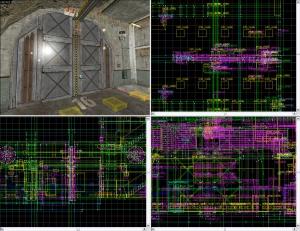
Still not perfect but with Visgroups as well it can be definitely be good enough. Hope these tricks help you all out.