
Archived from the original dev blog and left as it was written, so it reflects the game as it stood in 2008.
Last week’s article was criminally devoid of Black Mesa content so this week will remedy that. This week I’m going to be talking about adding a map feature and the process I used to create the bounce pads found in bounce.
First lets define what I consider a feature, as far as I’m concerned that is any map specific setup that is not a part of regular game play, in this case the bounce pad, your regular DM maps don’t all feature them and their implementation is based solely on the map and its needs, their a feature to enhance the map. When deciding if your map needs a feature or whether you want to add one the biggest question is always “Why” and “What does it add/change”. Simply adding a feature because it’s cool and it doing nothing quickly relegates it to the realm of a gimmick, something fancy for extra attention that really does nothing, and we all hate gimmicks, right? So I basically answered the following: Why are the bounce pads there? “To keep an open structure to the level but allow multiple and dynamic routes through the level”. What does it add? “A degree of freedom and interactivity that cannot be achieved through simple slopes or ladders… plus its cool”.
Now we know why were adding the feature and what it’s supposed to do let’s get down to the mechanics. An understanding of the game engine usually helps this process go faster but if you are lacking the experience or don’t know how it will work EXPERIMENT and explore your options. So the first point to consider with our bounce pads is that it’s supposed to throw the player up in the air, checking available entities gives us two options phys_explosion and trigger_push.
- The phys_explosion is highly uncontrollable force that covers a radius and is a very sudden effect, this doesn’t seem reliable.
- The trigger push is only in one given direction but is a very smooth force, this seems quite reliable so it’s my choice.
As noted I went with the most reliable effect, bugs generally happen when an unreliable approach is used and bugs can either be exploited or ruin the game play so their rarely what the Mapper wants. Testing however revealed a problem, the pushing force only pushes the player upwards when he is not touching the floor. This is basically a physics hack you find in source, you’re glued to the floor and not effect by upwards pushes. This mean the player would always need to jump which is un reliable and hard to explain to the player until they see it once. Your feature should always be simple so to keep things simple for the player we need to figure out how to detach the player from the floor. The simplest way to do this is either to bump the player up or let the floor drop out from under him, a quickly moving brush would do the trick so we take a look at the candidates: func_movelinear, func_door, func_tracktrain, and func_button.
- The func_movelinear is designed for this type of situation, just a quick movement in one direction nothing fancy; however, this is also why I’m disregarding it, it has little or no output so it’s hard to tie other effects into its movements.
- The func_door seems like an ideal candidate, easy quick straight movement and lots of outputs to tie things in!
- The func_tracktrain while meeting the input and output criteria is going to be disregarded because it specializes in complex movements and I only need a simple movement, plus the door is easier to set up with the same level of input and outputs.
- Last but not least is the func_button and it gains use in the final version of the bounce pad, it provides nearly all the outputs of a door but it also has some more inputs that make it a better choice than the door.
Early revisions of the bounce pad used the door until I decided the func_button gave me features I was after *wink*, so don’t be afraid to re-evaluate the plan. Now the final problem to setting this up is triggering the un-sticking mechanism so the player is affected by the push and turning the push on. The choices are either using the “Touch Activates” flag on the button or simply using a trigger_multiple. I opted for the trigger multiple so the bounce pad could sense objects other than the player *wink*. The shot below is an exploded version of the bounce pad, it shows how each component is put together into the final version (and that’s just a temporary placeholder you’re seeing for the bounce pad model).
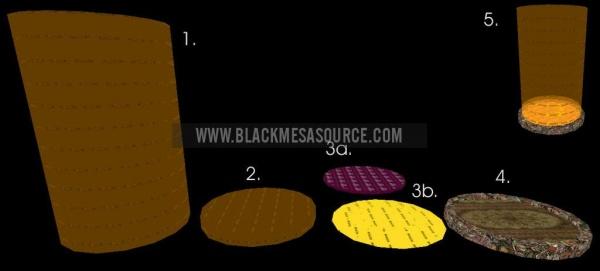
1. The trigger_push: It’s turned on for a very short period of time so the actual size is just the area of effect for it.
2. The trigger_multiple: This is for sensing objects the bounce pad should fling and sits just above 3.
3. The func_button: This is made up of 2 parts but basically un-sticks the player so they can be pushed and triggers associated sounds and effects. A: The player needs a very flat solid reliable base to be flung from for reliabilities sake. B: The other objects a bounce pad could fling do not need such a directly upwards push, tapering the edge gives the other objects trajectories other than a boring straight up.
4. The ‘model’ and associated effect: Nothing but eye candy, and with this place holder not good eye candy at that.
5. The assembled device in Hammer showing you how all the effects eventually overlap.
Now for those who missed the *winks* that’s a hint at some of the things I’ve changed up in bounce to take advantage of the new source features. Bounce is still maintaining the tricks, features, and ninja like action of the original so don’t worry; however, I did make it more beginner friendly so likewise I added more tricks for the pro’s and I’m sure your going to enjoy it.